https://techspirehub.com/wp-admin/post.php?post=38&action=edit
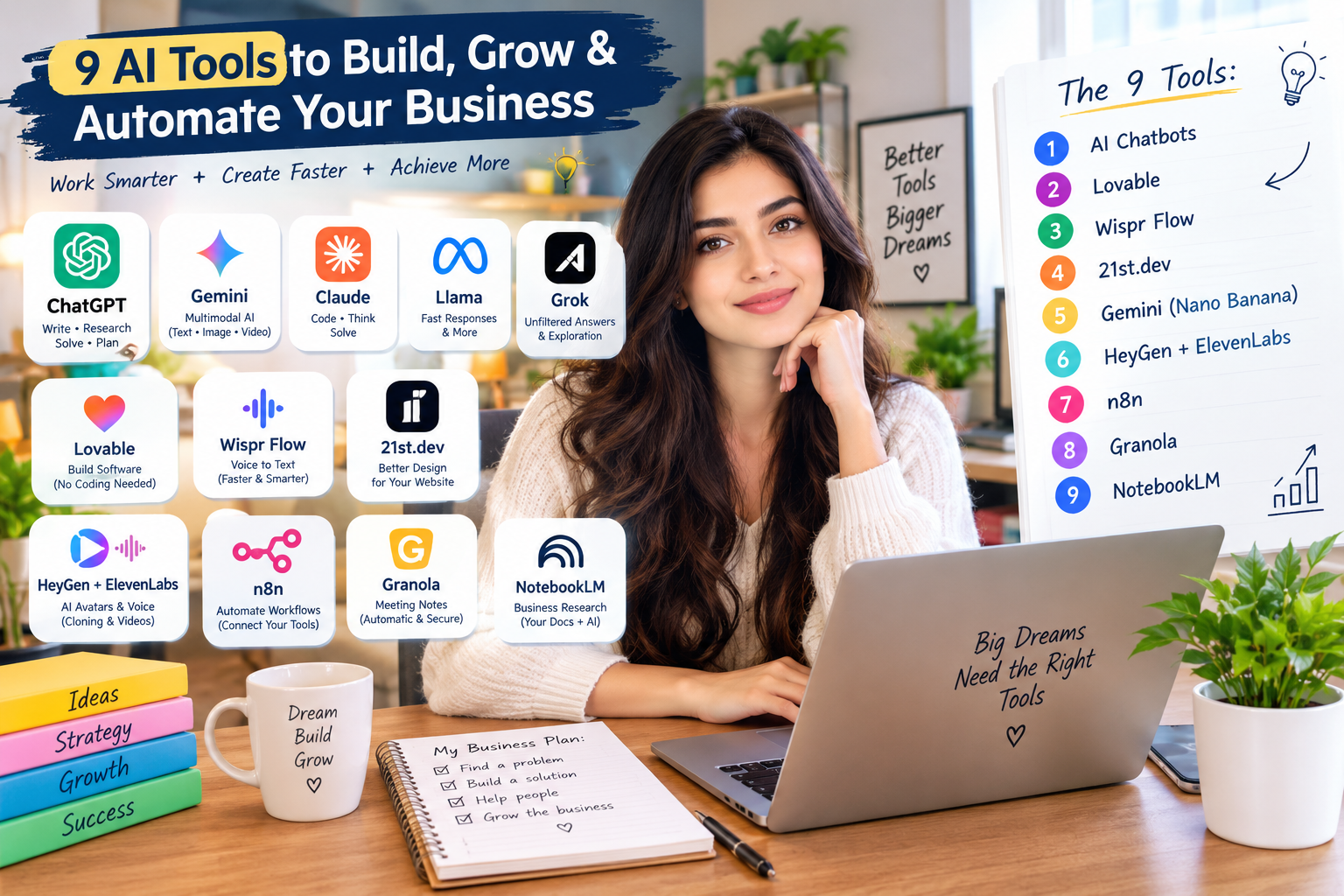
Tool Number One: AI Chatbots
AI chatbots can help you research ideas, solve problems, and complete tasks more efficiently. You may already use ChatGPT, but several other AI chatbots offer specialized features that can support different business needs.
Gemini: Google’s Multimodal AI Model
Google developed Gemini as an AI model and chatbot similar to ChatGPT. Gemini supports multimodal tasks, which means it can work with different types of content, including text, images, and video.
For example, you can provide a YouTube video link and ask Gemini to analyze the video and share feedback. This feature can help you understand video content without watching every minute yourself.
Claude: A Useful Tool for Software Development
Claude can help developers write code, build software, and solve complex problems. If you need to develop an application or work through a challenging programming task, you can use Claude to explore solutions and improve your code.
Claude also supports tasks that require detailed reasoning, making it useful for people who need help analyzing complicated ideas.
Llama: An Option for Fast AI Responses
Meta developed Llama, a family of AI models that developers can use for different applications. Llama can support tasks that require fast responses, depending on the model and implementation you choose.
You can consider Llama when you need an AI-powered application that responds quickly and fits your technical requirements.
Grok: An AI Chatbot for Open-Ended Questions
Grok offers another option for people who want to explore questions and discuss different topics. It can provide responses to a wide range of prompts and help users investigate ideas from different perspectives.
However, you should still evaluate its answers and verify important information rather than assuming every response is accurate.
ChatGPT: A General-Purpose AI Assistant
ChatGPT can support a wide range of everyday tasks, including writing, brainstorming, research, planning, and problem-solving. Its flexible features make it useful for business owners who need help with different activities.
Each chatbot offers different capabilities, so you should choose one according to your needs, budget, and preferred workflow.
Identify the Biggest Problems New Business Owners Face
Let’s use these tools to develop a product that helps people launch businesses.
Many first-time entrepreneurs have limited technical knowledge. They may have promising ideas but struggle to determine whether customers will actually pay for their products or services.
You can start by asking ChatGPT to identify the biggest challenges that new business owners face when launching their first businesses.
The answers can give you a starting point for researching problems that a new product could solve.
Use Reddit to Discover Business Ideas
Reddit provides another way to research customer problems. People frequently share their experiences, ask questions, and discuss frustrations in online communities.
You can ask an AI assistant to help you research Reddit discussions and identify common challenges among first-time entrepreneurs.
Look for recurring problems rather than relying on a single comment. You should also check the original discussions to understand what people actually need.
Turn a Common Problem Into a Product Idea
After researching potential customer problems, you can choose one and explore possible solutions.
For example, new entrepreneurs often struggle to evaluate their business ideas. You could develop a tool that allows users to describe an idea and receive an analysis of its potential strengths, weaknesses, and challenges.
The tool could examine factors such as the target audience, customer problem, competition, pricing, and potential demand.
This approach gives you a practical starting point for developing a product that addresses a real need.
Tool Number Two: Lovable Helps You Build Software
Lovable allows users to create software applications with the help of AI. You can describe the application you want to build without writing every line of code yourself.
This capability can help people with limited technical experience turn their ideas into working prototypes.
Ask AI to Evaluate a Business Idea
Let’s create a simple business idea evaluation tool.
You can ask Lovable to build an application where users enter their business ideas and receive an assessment. The application could divide the assessment into sections and assign each section a grade.
For example, the tool could evaluate customer demand, competition, target audience, pricing, and feasibility.
You should define the grading system clearly in your prompt. Explain what each grade means and which criteria the application should use when evaluating an idea.
Clear instructions help the AI understand the features you want and the results you expect.
Refine the Application Until It Works
You should not expect Lovable to build a complete application perfectly from a single prompt. You may need to review the generated application, identify errors, and ask the tool to fix them.
You should also test the application with different inputs to make sure it behaves as expected.
Some entrepreneurs have used AI-assisted development tools to launch products and generate revenue. However, building an application does not guarantee business success. You still need to validate your idea, understand your customers, and market your product.
Write Clear Prompts
Your prompts play an important role in the development process.
For example, instead of asking Lovable to give a business idea a grade, explain the grading scale, evaluation criteria, and expected output.
You could ask the application to provide a score for each category, explain its reasoning, and suggest ways to improve the idea.
The more clearly you describe your requirements, the easier it becomes to guide the development process.
Treat AI Like an Employee
You can get more useful results when you give AI tools the context they need.
Imagine asking an employee to build a product without explaining its purpose, audience, or requirements. The employee would have to guess what you wanted.
AI tools face a similar challenge. Explain your goals, share relevant details, and describe the results you expect. Then review the output and provide feedback.
This process helps you improve the results through repeated adjustments.
Test Your Business Idea
Once Lovable generates your application, test it with a realistic business idea.
For example, you could enter an idea for a YouTube channel that teaches people about business. The application might assign the idea a grade and explain its assessment.
If the results seem inaccurate or incomplete, improve your prompt and adjust the evaluation criteria.
Remember that an AI-generated grade represents the tool’s assessment, not proof that a business will succeed. You should also research your audience and gather feedback from potential customers.
Tool Number Three: Wispr Flow Speeds Up Writing
Typing can slow down your workflow, especially when you need to write long prompts, emails, articles, or business plans.
Wispr Flow offers voice-based dictation that converts spoken words into text. Instead of typing every sentence, you can speak your instructions and let the tool transcribe them.
Speaking can help you enter ideas more quickly, particularly when you have a lot to explain.
Improve Your Workflow With Voice Dictation
Wispr Flow can also format dictated text. Depending on your settings and the task, it can remove some filler words, organize information, and format spoken instructions into more readable text.
For example, you can dictate a list of tasks or explain the features you want in a software application.
You can then review the text, correct any transcription errors, and send it to your AI tool.
This workflow can reduce repetitive typing and help you communicate your ideas more efficiently.
Tool Number Four: 21st.dev Helps Improve Website Design
A functional website needs more than working features. Its design also influences how visitors perceive the business.
If a website looks unfinished or generic, visitors may question its quality. You can improve its appearance by using consistent branding, thoughtful layouts, and well-designed interface elements.
21st.dev provides design resources and interface components that developers can use when building websites.
Improve Your Website’s Appearance
Suppose you build an application with Lovable but want to improve its visual design.
You can explore available components on 21st.dev, choose a design that suits your project, and use its instructions or code within your development workflow when compatible.
For example, you could add an interactive element or a more polished visual component to your website.
After incorporating the component, review the layout and make sure it works correctly with the rest of your application.
Invest in Professional Branding
You can also hire designers through platforms such as Fiverr to create branding materials for your business.
A designer can help you develop a logo, choose brand colors, create social media graphics, and establish a consistent visual identity.
Professional branding can make your business look more cohesive and help customers recognize it across different platforms.
Tool Number Five: Google Gemini’s Nano Banana for Image Generation
AI image-generation tools can help you explore visual ideas before you invest in professional design work.
Google’s Gemini includes image-generation capabilities associated with Nano Banana. You can use these features to experiment with logos, illustrations, promotional graphics, and other visual concepts.
Generate a Logo Concept
Let’s create a logo for a fictional business called Dream Ideas, which encourages people to pursue their dreams.
You can describe the business, explain its message, and tell Gemini what you want the logo to communicate.
For example, you might request a simple, modern design that represents creativity, ambition, and personal growth.
The tool can generate a visual concept that gives you a starting point for further development.
Improve the Design Through Iteration
Your first generated image may not match your expectations. You can refine the prompt by specifying the colors, composition, style, and details you want to change.
For example, if the original design looks too complicated, ask the tool to simplify the shapes and create a cleaner visual identity.
You can repeat this process until you find a direction that better matches your vision.
You can then share the concept with a professional designer who can refine the design and prepare the appropriate files for your business.
Create More Than Logos
You can use image-generation tools for many other creative projects.
For example, you could develop T-shirt design concepts, create promotional mockups, or generate campaign visuals for social media.
Always review the results before publishing them. Make sure the images fit your brand, respect applicable rights, and accurately represent your products or services.
AI-generated designs can provide a useful starting point, but you may still need professional editing to achieve your desired result.
Tool Number Six: HeyGen and ElevenLabs for AI Avatars and Voice
HeyGen and ElevenLabs offer different AI capabilities that creators can combine to produce videos featuring digital avatars and AI-generated voices.
These tools can help business owners create video content without recording every message themselves.
Create an AI Avatar
You can start by opening HeyGen and exploring its avatar creation options.
Depending on the available features, you can upload suitable footage or images to create a personalized avatar. Some workflows require a video recording of yourself.
Follow the platform’s instructions and provide the required material to create your avatar.
Add a Script to Your Video
After creating the avatar, prepare a script that explains what you want it to say.
You could write a short introduction, a product explanation, or a message for your audience.
Enter the script into the appropriate video-generation interface, select your preferred settings, and generate the video.
The platform will process the material and produce a video based on your selections.
Improve the Voice and Presentation
You can use ElevenLabs to generate speech or create a voice clone when you have the necessary permissions and meet the platform’s requirements.
Combining an avatar with generated speech can help you produce videos for advertisements, educational content, and social media.
However, you should review the finished video carefully. Check the voice, pronunciation, facial movements, and overall presentation before publishing it.
Always obtain permission before cloning another person’s face or voice. Clearly disclose synthetic media when appropriate, and avoid misleading viewers about who appears in a video.
Tool Number Seven: n8n Automates Business Workflows
After building a product, you need to attract customers and distribute your content. Managing these tasks manually can take considerable time.
n8n is a workflow automation platform that lets you connect different applications and automate processes.
Connect Your AI Tools
You can use n8n to connect supported services and create a workflow that performs several tasks in sequence.
For example, you could build a workflow that detects a newly published blog post, sends its content to an AI tool to create a video script, and prepares a video for social media.
Depending on the integrations and permissions you configure, the workflow could also publish content to supported platforms.
This approach can reduce repetitive work and help you maintain a more consistent content schedule.
Build an Automated Content Workflow
A typical workflow might follow these steps:
- Detect a newly published blog article.
- Extract the article’s main ideas.
- Ask an AI tool to prepare a video script.
- Generate or assemble the video using a compatible service.
- Review the content and prepare it for publication.
- Publish or schedule the content through an authorized integration.
You should test every step before allowing the workflow to run without supervision. Add error handling and review points where necessary.
Automation can save time, but it does not replace the need for useful content, audience research, and a clear marketing strategy.
How Do AI Platforms Make Money?
Before choosing an AI tool, you should understand its business model and the costs associated with using it.
Different platforms earn revenue in different ways. Some charge monthly or annual subscription fees, while others offer free access with paid upgrades.
Some services also charge according to usage, computing resources, or the number of features you need.
Understand n8n’s Business Model
n8n offers options for users who want to host workflows themselves, as well as hosted services that manage much of the infrastructure.
Self-hosting can provide more control, but you may need to manage a server, installation, maintenance, and security.
Hosted plans can reduce the technical work because the provider manages the infrastructure. However, you should check the current pricing and usage limits before choosing a plan.
Review the Costs Before You Commit
Before using any platform for your business, consider the following questions:
- Does the platform offer a free plan?
- What features require a paid subscription?
- Does it charge for usage or additional resources?
- Can you export your work or move it to another service?
- What happens to your data when you use the platform?
- Does the platform meet your privacy and security requirements?
Understanding these details can help you choose tools that fit your budget and business needs.
Tool Number Eight: Granola for Meeting Notes
Launching a business often involves meetings with clients, collaborators, investors, and team members.
Granola helps users capture meeting information and turn it into organized notes. Its features can reduce the need to write every detail manually.
Organize Meeting Information
You can use a meeting-notes tool to record important points, summarize discussions, and identify action items.
For example, after a conversation with a potential client, you may need to remember the client’s requirements, agreed deadlines, and next steps.
Organized notes can help you follow up and keep your projects moving forward.
Understand How the Tool Handles Your Data
Granola’s workflow differs from meeting assistants that join calls as visible participants. You should review its current documentation to understand how it captures audio, processes information, and stores meeting notes.
Before recording or transcribing a conversation, inform the other participants and obtain any consent required by law or your agreement with them.
You should also review the platform’s current privacy policy and security documentation before sharing confidential business information.
Protect Your Privacy When Using AI
AI tools can help you work more efficiently, but you should understand how each platform handles the information you provide.
Avoid assuming that every tool follows the same privacy practices. Different companies may collect, process, retain, or use information in different ways.
Read the Privacy Policy
Before creating an account or uploading business documents, review the platform’s privacy policy and data-handling settings.
Pay attention to how the service uses your prompts, files, recordings, and generated content.
You should also check whether the platform offers controls for data retention, model training, account deletion, and access permissions.
Avoid Sharing Sensitive Information Unnecessarily
Think carefully before entering personal details, customer records, passwords, financial information, or confidential business plans into an AI tool.
Use only the information necessary to complete the task. Where possible, remove identifying details and use sample data instead of real customer information.
These precautions can help you reduce unnecessary exposure while still benefiting from AI-assisted work.
Tool Number Nine: NotebookLM for Business Research
NotebookLM is Google’s AI-powered research and note-taking tool. It can help you organize information from supported sources and explore the material you provide.
This capability can be particularly useful when you have many documents about your business.
Upload Your Business Documents
You can add supported source materials, such as PDFs and other compatible documents, and connect available Google files where the service supports them.
For example, you could organize company information, product descriptions, research documents, planning notes, and presentations in one workspace.
NotebookLM can then help you ask questions about those sources and find relevant information.
Give AI the Context It Needs
Instead of repeatedly explaining your business from the beginning, you can ask questions based on the materials you have already provided to NotebookLM.
For example, you could ask it to summarize your product strategy, identify key points in your research, or compare information across your documents.
You should still check the answers against the original sources, especially when you need accurate figures, quotations, or important business details.
Also, avoid uploading confidential documents unless the platform’s data-handling practices meet your requirements.
Help Other People Achieve Their Goals
Building a successful business starts with understanding what people need and finding practical ways to help them.
AI tools can support this process by helping you research problems, develop products, create content, improve designs, and automate repetitive tasks.
However, tools alone do not guarantee results. You must still understand your audience, test your ideas, improve your product, and build trust with your customers.
When you create something that genuinely helps people solve a problem, you give them a reason to use your product and return to your business.